My Me-ware1 (so far)
Disclaimer: The main body is all handwritten prose, but there are footnotes and extended sections that are claude generated. They are clearly marked as such. 2
Software has gotten cheap. As a professional programmer this has been quite complicated for me. I've taken some time to reassess what I want to be working on and where I want to be doing that. During this tumultuous time I've discovered a real bright spot: the software I've been able to create just because3. And it looks like I am not the 4 only one.
So come along and check out some of what I've been working on. I hope you'll be inspired to join in and share what software you've made!
My favorite projects so far are:
- An android launcher that sorts your apps by color (and open sourced the base that you can generalize)
- An old e-ink tablet5 converted to have a dual function as our passive family calendar
- Porting an amazing roguelike (2D, turn-based) into a 3D realtime game playable in the browser.
- Setting up something of a homelab for the first time (and the joys of using Nixos + coding agents)
The process in making them has been wonderful. The loop of working on software that is primarily for yourself and using coding agents means you can start using your software overnight.
There will be bugs, missing features and disappointments, but you are always an alt-tab away from fixing them or adding that one thing that would make your usecase work.
I'll dive into each of these projects, what working on them has been like and links out to sources so you can experiment yourself.
Hueistic
A (moving) picture is worth 1000 words:
For over a decade I've wanted an android launcher that sorts apps via color.
My process for finding most apps has been to scroll through the list hunting for the red of youtube, or the green of whatsapp. Yes I know I should organize my phone better, but that's not fun. I am sure building it out by hand would have had plenty of fun, but it simply felt like too much to learn just to scratch that itch. So the idea sat, in idle conversations and at the back of my "Ideas" journal for years.
With claude code I had a demo up (and on my phone) within a day.
Being able to start playing with color sorting on my phone almost immediately lulled me into a false sense of completion. The laundry list of details and unstated expectations was coming.
You can't just build an app drawer. App drawers are something a launcher owns. So you now have to build a launcher and with that: the home screen, the active app selector, placing and displaying widgets, the ability to uninstall apps, handling apps that can't be uninstalled and so many little details you've come to expect (folders on the home screen, resize widgets, drag across home screens etc).
One of the dangers of taking on a task like this from scratch is that you end up finding these things out as you go. As it happened the vast majority of the time has been building out those details, not to mention the fact that it is still not accessible on google play, which brings us to some of the painful details when software goes beyond personal: the gate keepers.
Part of building out Hueistic specifically had been to experiment with what it is like to actually launch an android app & accept payment. This is a many step process that I am still in the middle of.
To allow others to get your app on google play:
- register for a google play console developer account
- register the app
- write a description for the app
- define the markets your app will launch in
- go through a checklist of features that your app has
- register a privacy policy
- submit your app for approval
- go through internal testing
- apply for closed testing
- have 12 different "closed" testing users use it for 14 days <-- I am here (and could use your help! Join the beta)
- apply for production
And that does not account for accepting payment which is more steps.
In contrast if you are simply trying to use it on your personal phone it is:
- build the apk & install it on your phone
Or if it's free and for just a couple people use the excellent obtainium
Sharing the progress so far
But you don't need to fall into the trap of building out all of those features if you want to scratch your itch for an android launcher that has an "open a random app" button, or hides certain apps at different times of the day, or plays pachinko with your apps.
I've open sourced a generic version of hueistic as generic-launcher. Download it, point your coding agent at it and give it a request like (typos included as I actually made those typos and it handled it fine)
Make a silly demonstration branch of the generic launcher that makes it so the app icons act like they are little buttons pinned at the top to the backing, so when you giggle the phone they wobble back and forth. Something clearly whimsy and silly to demonstrate a point about hyper personalized software
and a little bit of waiting later get:6
Please take the code and make your own silly version7, I'd love to see them!
Re-calendar
I have an old remarkable 2 and in spite of my love for e-ink it was sadly gathering dust. It kept finding its way to the back of a drawer and then not having charge when I wanted to use it. I wanted to give it new life.
Now look at the place that it occupies in our household! 8
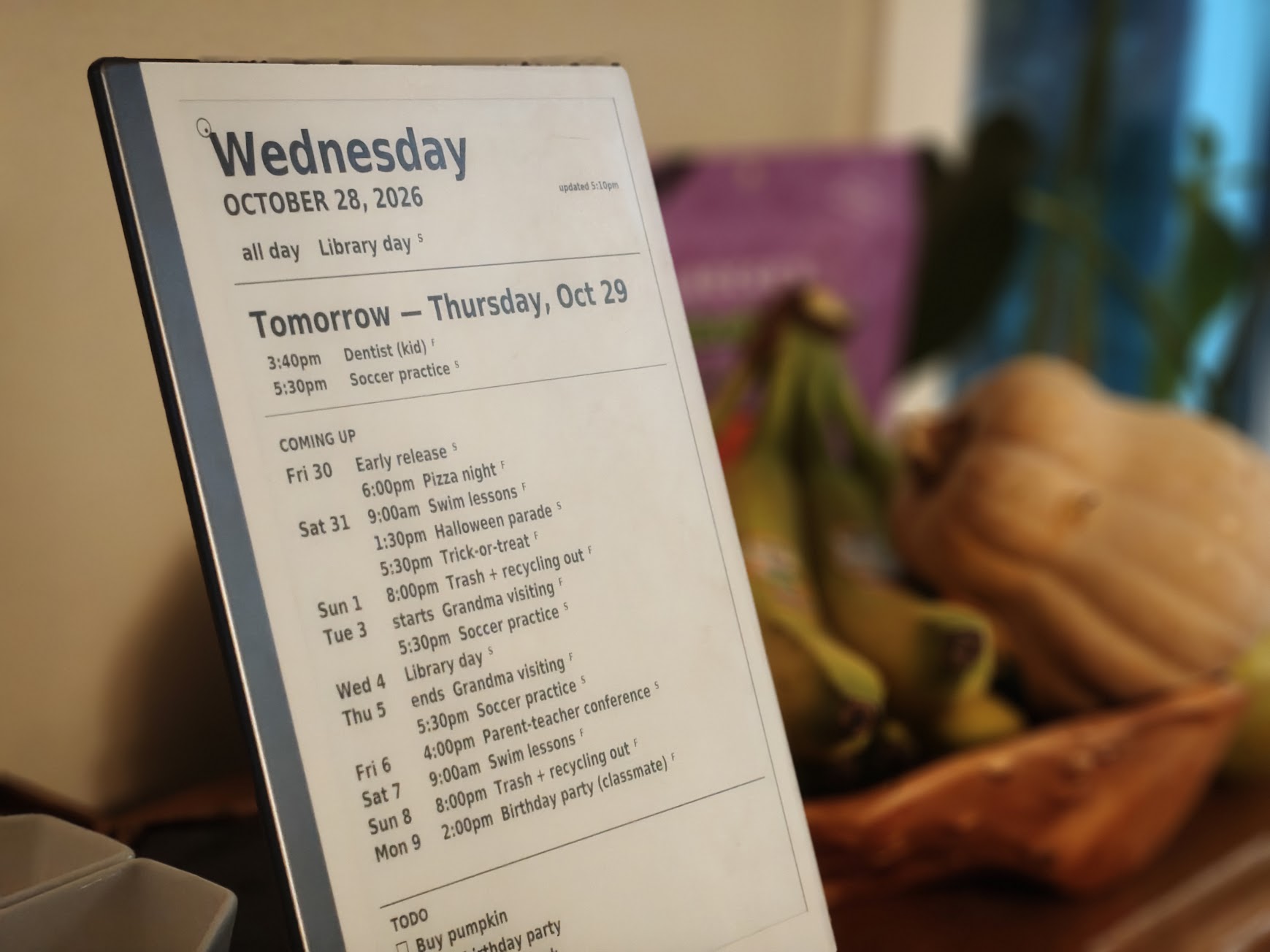 This is where the calendar usually sits, on a cabinet in the dining room; visible, but out of the way.
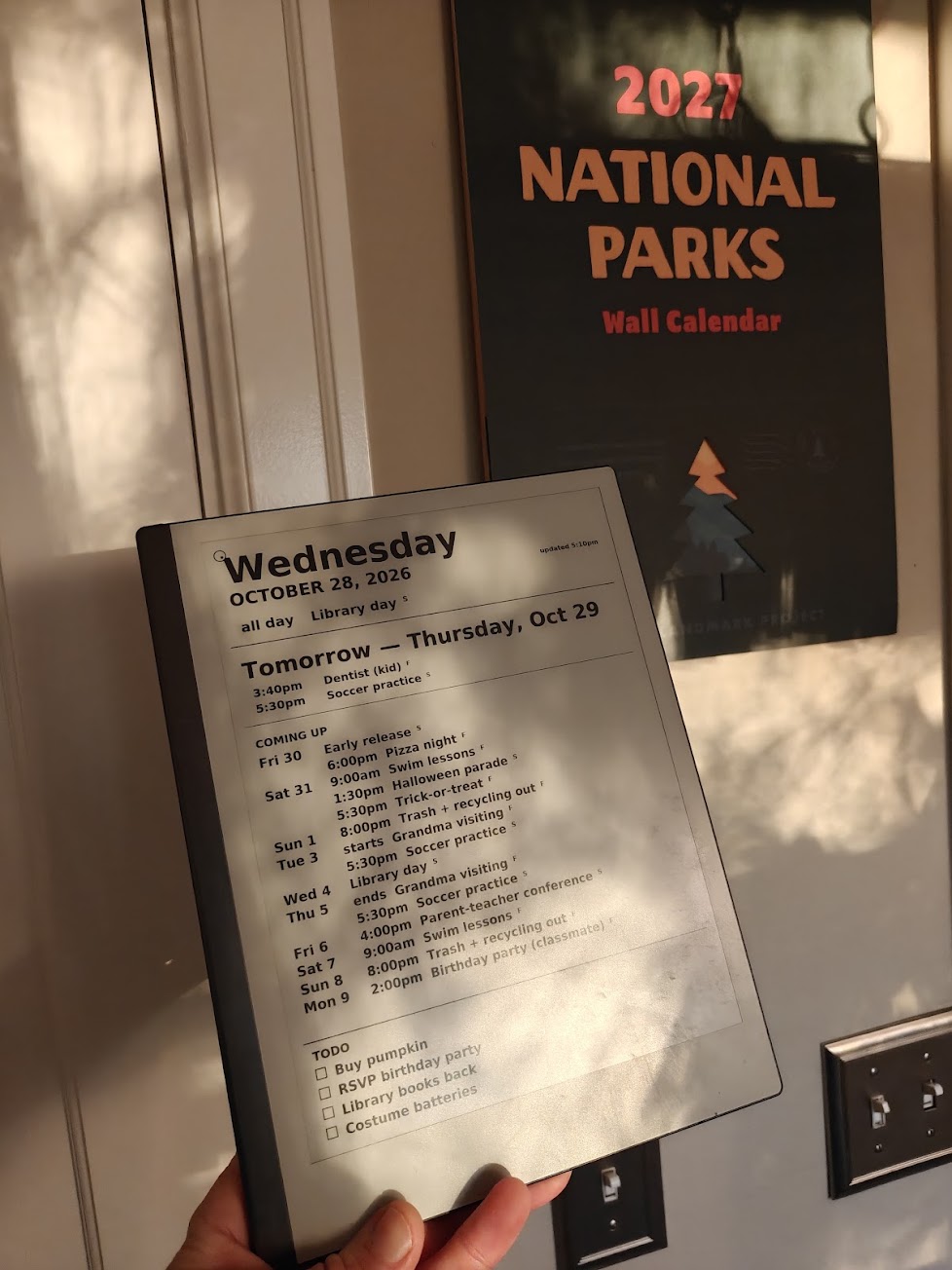 What it looks like when carried around. Mostly included because I love how e-ink looks with natural light.
Our family calendar is on google calendar, but pulling out our phones or computers to check what's on the schedule brings a whole host of distractions with it. Not to mention our 6 year old doesn't have a phone or a computer to check on!
Giving an important and useful digital object (our calendar) some physical embodiment and avoiding backlight glare feels great. I've also found that I actually use the tablet more now because I know where it is and it's consistently charged9.
It's almost certainly not going to fit your exact use case, but for reference the repo is here and a claude written write up
Cataclysm 3D
Cataclysm Dark Days Ahead (CDDA) and the fork Cataclysm Bright Nights (CBN) are not only amazing games, they are also truly notable as open source projects in and of themselves. By github's count CDDA has 2.2k contributors10 and CBN has 1.4k. The history goes back 16 years, and in the case of CDDA there is over 1 million lines of C++ and 2 million lines of JSON game data.
The game has serious depth. You start off as a survivor after a (drum roll please) Cataclysm, resulting in lots of dangerous things (mostly zombies). Surviving is a tall order, but if you make it past the first couple nights you learn the complexity that you're in for.
Some examples:
-
You find some great gear while rummaging in an abandoned house, but when you go to pick it up the game reminds you that you can only carry what fits in your pockets. Time to find a backpack or even just some cargo pants!
-
If you find a car it probably needs repair, to do that you need to find some mechanic books, an acetylene torch, a tank of oxygen and all the tools you'd expect.
-
If you run out of gas you can siphon from another car, I hope you already found a rubber hose!
-
Now you've noticed all the perishable food is rotting in houses, come spring will you be sowing crops? The list goes on.
Also typical of the old-school roguelike genre it is punishingly difficult, both in terms of gameplay and the key combinations, and menus to navigate.
It used to be a game I played a lot, but I never could quite share the game with friends, I wondered if there's some way to present the game that could let a whole new group experience some of the magic of what CDDA & CBN are.
2D -> 3D
Clearly a 3D, real time game is something that is much easier for a modern gamer to take a shot at. But given the amount of code and deep history of the game, I didn't have a lot of hope, so mostly as an interesting test case, I gave the following prompt (yes typos and all 😬):
You have a large task ahead of you. You're going to be making a real time 3d version of Cataclysm Dark Days Ahead. You'll be aiming to keep as much of the style, content & approaches to game design as possible while converting this to a fully real time 3d game. This is an excersize in determining how much you can do automomously there will be a brief period at the start to ask the user questions. After that you are expected to lead a team of subagents to deliver a fully working game. You'll be judged on completeness, how much you were able to retain and enjoyment. Bonus points for closely using similar graphical style by immitating the graphic appraoch used by project shadowglass. Now is your opportunity for asking questions go!
I answered 4 questions and then went to bed. 5 hours later and 1.4M output tokens claude code stopped and waited for me to wake up, when I did I was stunned to see the world that I played so much rendered in 3D.
Of course I ran into bugs straight away11, but ever since then I've been enjoying playing along and tweaking it as I go.
I made this primarily for myself and to show some friends, but you can of course play it here, see the source code here.
For those that want a deeper look: check out screenshots comparing before and after, how many tokens were spent, and what the tokens were spent on: Building CDDA-3D · short version
Homelab (& ❤️ nixos12)
And lastly and least share-ably I've been really enjoying starting to do more "self-hosting" something I always wanted to do, but avoided due to perceived level of effort.
Networking
My desktops are multiple floors away from the router and I've been limping along without an ethernet cable, but my old wifi card had an antenna snapped off and didn't support wifi 7. I figured I'd buy a new card and install it then call it a day, but I checked after installing I was still at ~9 Mbit/s :/.
Fixing the wifi card
The new wifi card should not only buy me wifi 7 support, but it also has better antennas, so what's happening? Turns out the problem was the new card didn't even have a driver on the linux kernel version I was running at the time.
Claude identified a driver for the card, but it was out-of-tree and upgrading kernel versions was difficult due to running an old graphics card.
After some prompting claude went from identifying an appropriate driver to building it and installing it in the kernel. Rebooting yielded both the graphics card and network card failing to come up, but nixos came to the rescue. I was able to select an old generation and informed claude what errors came up, a second reboot gave me a fully working system.
Networking continued (wifi edition)
Unfortunately even with the new card I was still seeing poor speeds, claude was able to not only identify a zombie extender (a router that was set to extender mode but failing to route any packets) and that the band the router was selecting kept getting interrupted. Pinning the acceptable channels in the router brought us up to ~228 Mbit/s. (the full story, written by Claude)
Setting up a new computer
As you may have guessed the computer I was working on was quite old. I bought a new computer and wasn't really looking forward to the well-worn path of setting up a new computer exactly how I wanted.
Instead I decided to see if claude could handle it. I told claude what the computer I bought was and that it would be responsible for setting it up. It partitioned my current nixos config into supporting two hosts and built a USB with the config. I plugged in the USB and went through the install process, but hit a bug: No wifi on the new machine.
Now I could either lug the computer to the router, or debug by copying by hand. I thought it should be possible to just hook them directly up with ethernet. So I did & told claude, it served its ssh key on a server and asked me to run
sudo sh -c 'mkdir -p /root/.ssh && curl -s http://10.42.0.1:8765/k >> /root/.ssh/authorized_keys'
i.e. land its current ssh key on the new box so it can ssh in and fix the issues.
From there it rebuilt the system, fixing multiple smaller bugs it found, and then copied over my /home from my old server to new.
It was by far the easiest I have ever had a new machine up and running exactly how I want it. Now I can configure both machines from ~/nixos13.
Now it's your turn!
If any of these have inspired you or seem useful, please point a coding agent at the repos and start asking for whatever changes fit your usecase, just don't forget to share and inspire others!
#hyper-personalized-software #home-cooked-software #meware #myware
-
I've thrashed on the name, the original title referred to "hyper-personalized software". I just didn't find that phrase "sparking joy". I've also seen "home-cooked software" and "situated software", I do quite like "myware" but it's phonetically so close to spyware... What do you think? ↩
-
I'd generally prefer to not include any claude generated prose, but I also struggle to leave out so many technical details. I am experimenting with using claude for allowing for the technical deep dives that I would have omitted, but including not only a disclaimer at the top, but a separate visual style than the rest of the piece. ↩
-
Yes I know I could have done this before coding agents. The sad reality is that between working and living a full life away from computers I just never found enough time to accomplish much. With coding agents I am finding it much more possible to create things that I value with the time I have to do it. ↩
-
If you were only gonna read one of these, read this one! Maggie Appleton was writing about this exactly when it started to become possible. ↩
-
A Remarkable 2 ↩
Claude The wobble branch makes every icon a button pinned by its top edge: tilt the phone and the icons hang toward the new "down"; jiggle it and each one swings at its own rate (seeded from its package name), then settles. The whole whim was a ~90-line damped pendulum (
Pendulum.java), the Android glue for the accelerometer (Wobble.java), and oneWobble.pin(icon, seed)line in each of four icon surfaces. The generic launcher's 796 existing tests still pass, alongside 13 new ones for the swing. Full Claude-written companion → ↩-
The code for wobble and another silly "lived-in" copy where the icons that you haven't used accumulate dust & cobwebs are in branches wobble and lived-in ↩
-
This is a generated calendar, but ours looks similar. I personally found this format to be nice, I originally demoed 6 different styles and a traditional calendar was hardest to read across the room and least information dense. ↩
-
It needs to be charged ~once a week, it wakes up every 30 minutes to fetch our calendar, it sets that as the idle "screen-saver" so in between wakeups it draws almost no power. ↩
-
I was an active contributor in the past, mostly refactoring stuff, sorting visible items by proximity, other quality of life stuff ↩
-
The most immediate bug was that it auto translated a lot of the short key commands that work for the original directly to the web based port that had some classic keys added, like WASD to move and shift to run. As soon as I tried to run forward the (W)ear menu popped up. Further bugs included zombies floating in the sky, getting into a fender bender being insta-death, car headlights shining into subterranean basements and many more ↩
-
I run Nixos as my primary OS for my desktop and server.
Without coding agents I could only really recommend using the nix package manager, but wouldn't really recommend using nixos. The language is kind of funny and when you need something outside of nixpkgs you get hit with a wall of complexity.
But with claude handling a lot of that complexity it goes away and you get some wonderful benefits. The most obvious is trivial rollbacks, if something didn't work like you expected you can always select an older generation in the boot menu. That's nothing new with coding agents, but gives some safety. ↩ Claude The order of events: Claude researched the machine before it arrived, wrote its config, the disk layout and a custom installer USB, and then probed the real hardware from the live USB and corrected its guesses. It imaged the 39 GB of factory partitions and pushed the whole built system across the cable with
nixos-anywhere. The one step it didn't take was the disk wipe. Claude Code's auto-mode safety check blocked it, so Claude wrote a script that makes you typewipe, and waited. Full Claude-written companion → ↩